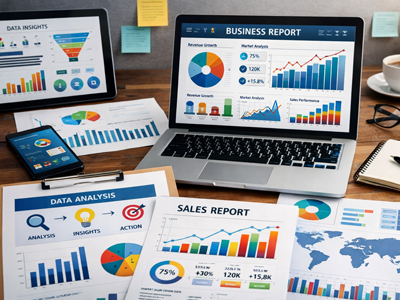

In the modern business landscape, data is often called “the new oil.” But just like crude oil, raw data is messy, unrefined, and difficult to utilize effectively. If you present a stakeholder with a 50-page spreadsheet full of raw figures, their eyes will glaze over before they reach page two.
The magic happens when you refine that data into visual stories. Using data visualization and charts in business reports isn’t just about making things look pretty; it is about driving comprehension, speeding up decision-making, and uncovering hidden insights.
In this guide, we’ll explore how to leverage charts and data visualization techniques to transform your business reports from boring text-heavy documents into compelling strategic assets.
Read Also: Business Intelligence: How Data-Driven Insights Boost Growth and Decision-Making
Why Visuals Matter More Than Text
According to research, the human brain processes images 60,000 times faster than text. When you present data visually, you engage a different part of the brain, allowing stakeholders to grasp complex concepts quickly.
Here is why integrating charts into your reports is crucial for SEO—Search Engine Optimization in the business sense (gaining visibility and understanding among leadership):
- Clarity: Charts eliminate ambiguity. A line graph shows a trend instantly, whereas a table requires mental calculation.
- Engagement: Visual reports keep the audience’s attention longer.
- Persuasion: Data-driven visuals are harder to argue with than opinions. They provide the “proof” behind your proposals.
Choosing the Right Chart for the Right Story
One of the biggest mistakes in business reporting is using the wrong type of chart. Selecting the wrong visualization can confuse your audience or, worse, mislead them. Here is a quick guide to choosing the right format for your data narrative.
1. Line Charts: The King of Trends
Use line charts to show changes over time. Whether you are tracking monthly recurring revenue (MRR), website traffic, or customer churn, the line chart is your go-to.
- Best for: Time series data, trends, acceleration.
- SEO Tip: When labeling, use clear anchors like “Q1 2023 vs. Q1 2024” to provide context.
2. Bar Charts: The Comparison Tool
Bar charts are excellent for comparing categories. If you need to show sales performance across different regions or departments, a bar chart is more effective than a cluttered pie chart.
- Best for: Categorical comparisons, rankings.
- Pro Tip: Sort your bars in descending order to make the “top performer” immediately obvious.
3. Pie Charts: Use with Caution
While popular, pie charts are often misused. They work best when you are showing a simple part-to-whole relationship with only 2 or 3 categories.
- Best for: Market share, budget allocation (simplified).
- The Warning: Avoid using pie charts for more than 5 segments; they become unreadable.
4. Scatter Plots: Finding Correlations
When you need to prove a relationship between two variables (e.g., ad spend vs. revenue), a scatter plot shows distribution and outliers.
- Best for: Statistical analysis, identifying clusters, proving hypotheses.
The Art of Data Storytelling
A chart without context is just a shape. To make your business report SEO-friendly (meaning it gets used, shared, and referenced), you must master data storytelling.
A strong data narrative follows three steps:
- Set the Context: Before you show the chart, explain what the audience is looking at. “Due to the Q3 marketing campaign, we saw a significant uptick in user acquisition.”
- Show the Insight: Use the chart to highlight the “aha” moment. Use annotations (arrows or text boxes) on the chart to point to the specific spike or drop you want them to notice.
- Prescribe Action: Data is only valuable if it leads to action. “Based on this 20% spike, we recommend doubling the budget for this specific channel next quarter.”
Common Pitfalls to Avoid
Even experienced analysts can fall into traps that undermine their credibility. To ensure your business reports are effective, avoid these common visualization mistakes:
- Misleading Axes: Starting the Y-axis at a number higher than zero can exaggerate minor changes. Always ensure your axes are labeled clearly and start appropriately for the context.
- Chart Junk: Avoid excessive 3D effects, heavy gridlines, or unnecessary gradients. These “decorations” distract from the data. Stick to minimalist design principles.
- Using the Wrong Scale: If you are combining datasets (e.g., units sold vs. revenue), ensure you aren’t inadvertently using the same scale for two different metrics without clarifying use of a secondary axis.
Tools to Elevate Your Reporting
You don’t need to be a graphic designer to create high-quality data visuals. Several tools allow business professionals to create interactive or static reports that rival design agencies:
- Microsoft Power BI & Tableau: The industry standards for interactive dashboards. Perfect for live reports that update in real-time.
- Google Looker Studio: A free, excellent tool for marketers. It integrates seamlessly with Google Analytics, Search Console, and Sheets.
- Canva & Piktochart: For those creating presentation-style reports, these tools offer “drag-and-drop” simplicity with beautiful templates.
Read Also: What is Machine Learning?
Data is the Language, Charts are the Voice
In today’s fast-paced business environment, your ability to communicate data effectively is just as important as your ability to analyze it. By choosing the right charts, mastering data storytelling, and avoiding common visualization pitfalls, you can ensure your business reports are not just read, but acted upon.
Remember: the goal of a business report isn’t to show how much work you did; it’s to help your organization make better decisions faster. Let your data tell the story, and let the charts make it sing.

Grab this Business Writing Paperback
Master the art of professional communication with this Business Writing eBook. Learn how to craft clear, concise, and persuasive business documents—from emails to proposals—to boost your credibility and success in the workplace.